
NCS funding
Register children for the National Childcare Scheme — Meadow applies it to their plan automatically.
The National Childcare Scheme (NCS) provides a subsidy towards childcare costs. In Meadow you record each child's NCS award once, and from then on the funding is worked out for you. You don't attach NCS to a plan — once a child has a valid award, their booking plan picks it up automatically.
Managing NCS is for owners and managers.
Where to find NCS
NCS lives under Reports → NCS in the sidebar — it isn't a top-level menu item. Open Reports, then choose NCS to see the roster.
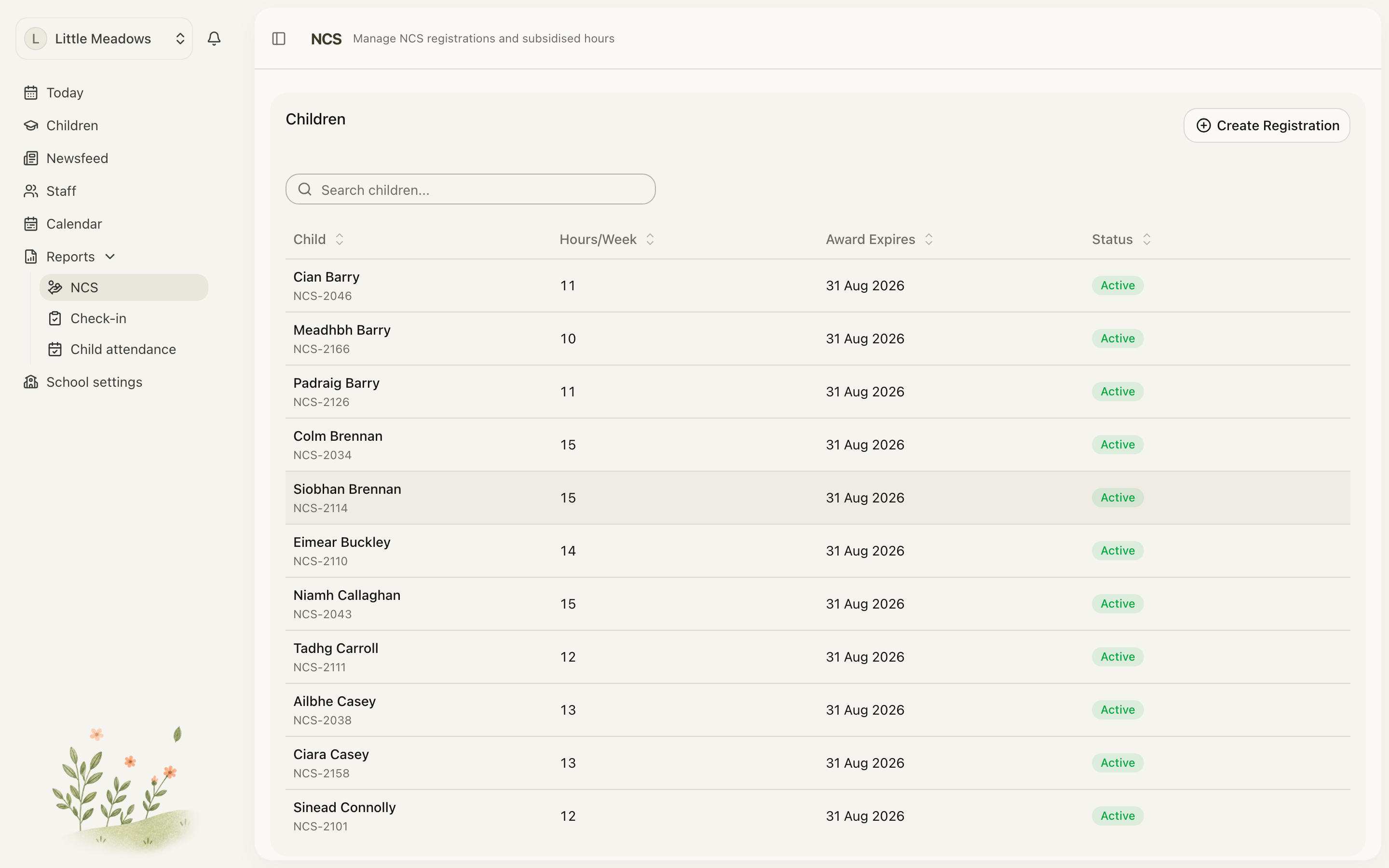
The roster has two parts:
- Needs Action — flags any awards that are expiring soon or have already expired, so nothing slips through.
- Children — every child with an NCS record, showing their CHICK #, Hours/Week, Award Expires and Status (Active or Ended). Use the search box to find a child quickly.
Recording an NCS registration
You can add a registration in two places:
- From the roster, click Create Registration.
- From a child's profile, open the Bookings tab, go to the Funding section, and click Add NCS.
Either opens the same sheet.
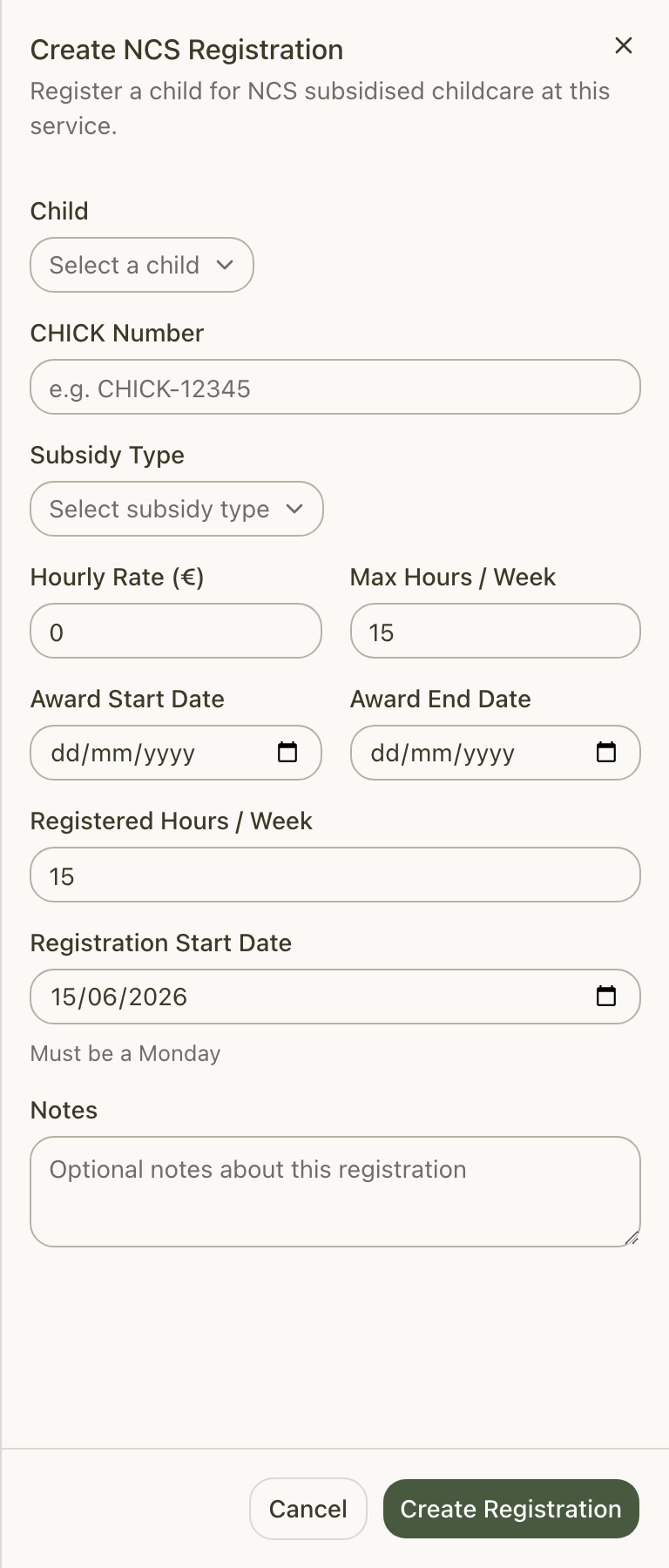
Fill in the registration:
- Child — choose the child the award is for.
- CHICK Number — the child's NCS reference (for example,
CHICK-12345). - Subsidy Type — pick Universal, Income Assessed or Sponsor. Choosing one fills in the Hourly Rate (€) and Max Hours / Week from the national rate reference.
- Hourly Rate (€) and Max Hours / Week — adjust these if your award differs from the default.
- Registered Hours / Week — the hours your service is registering. This can't exceed the Max Hours / Week.
- Award Start Date and Award End Date — the dates of the NCS award.
- Registration Start Date — when registration at your service begins. It must be a Monday and must fall within the award period.
- Notes — optional, for anything you want to keep on file.
Click Create Registration. You'll see NCS registration created.
Note: The Registration Start Date follows the NCS (HIVE) rule that registration must begin on a Monday. The form defaults to the next Monday, so you usually don't need to change it.
How NCS reaches the plan
This is the part people most often get wrong, so it's worth being clear: you never attach NCS to a plan. There's no per-plan step.
Once a child holds a valid CHICK award, their booking plan's funding allocation adds up the Registered Hours / Week from every currently valid award. Those hours are capped at the child's booked hours that aren't already covered by ECCE funding — ECCE always comes first, then NCS covers the rest of the booked week up to the registered hours.
If you open a child's Bookings tab while editing their plan, the funding rail shows this live. The on-screen note reads: ECCE and NCS are applied automatically — from the child's ECCE registration and current CHICK award(s).
More than one CHICK
A child can hold more than one award at the same time — for example, where separated parents each hold their own CHICK. Meadow simply sums the registered hours of every currently valid award (still capped at the child's non-ECCE booked hours).
Managing a registration
Click a child's row in the Children table (or Manage on the Funding section row) to open the detail sheet. From here you can Edit, End or Renew an active award.
Edit
While an award is active you can change the CHICK Number, hours, rate, max hours, Award End Date and notes, then Save.
End
Use End when an award is finishing. Set a Registration End Date (it defaults to today) and click End. The award is then marked Ended.
Note: If the end date you set is on or before the Registration Start Date, Meadow treats it as a cancellation before it began and removes the registration entirely rather than marking it Ended.
Renew
When an award is expiring or has expired, a Renew option appears. Renew NCS Registration pre-fills a fresh award window (the day after the old award ends, plus 52 weeks) and the next Monday start date. Enter the new CHICK Number and click Renew.
Renewing creates a new registration. The old award is left to age out on its own end date — so it stops funding without double-counting.
Tip: Don't manually End an award you mean to Renew. Renew adds the new CHICK and lets the old one age out for you; ending it first isn't needed.
Common questions
Do I need to attach an NCS registration to a child's plan? No. NCS is applied automatically. Once a child has a valid CHICK award, the plan's funding adds up the registered hours of every current award and caps them at the booked hours that aren't covered by ECCE. Add NCS creates the record; Manage edits, ends or renews it.
The registration won't save — it says the start date must be a Monday. The Registration Start Date must be a Monday and must fall within the Award Start Date and Award End Date. The form defaults to the next Monday. Two other things can block a save: registered hours that exceed the maximum (Registered hours cannot exceed maximum hours), and an award end date that isn't after the start date.
A child has two CHICK numbers — is that supported? Yes. A child can hold more than one active award, which is common where separated parents each hold their own CHICK. Each current award's registered hours are summed in the funding allocation, capped at the child's non-ECCE booked hours.
What's the difference between End and Renew? End closes the current award — set a Registration End Date (if it's on or before the start date, the registration is removed as a pre-start cancellation). Renew adds a new CHICK with a fresh award period and lets the old one age out by its end date. Use End when care is stopping; use Renew when the award is being extended.
An award has expired — why has its funding stopped? Once an award's end date passes, Meadow stops counting its hours, even though it may still show on the roster. The Needs Action card flags expiring and expired awards so you can Renew them in good time.