
Contacts and relationships
Record the people in a child's life — parents, family, emergency contacts and who can collect them.
Every child has a circle of people around them — parents, grandparents, the aunt who does the school run. In Meadow you keep them all on the child's Family tab, so your team always knows who to call and who's allowed to collect.
You can add contacts while adding a child, or at any time afterwards. Here we'll focus on managing them once the child is set up.
The Family tab
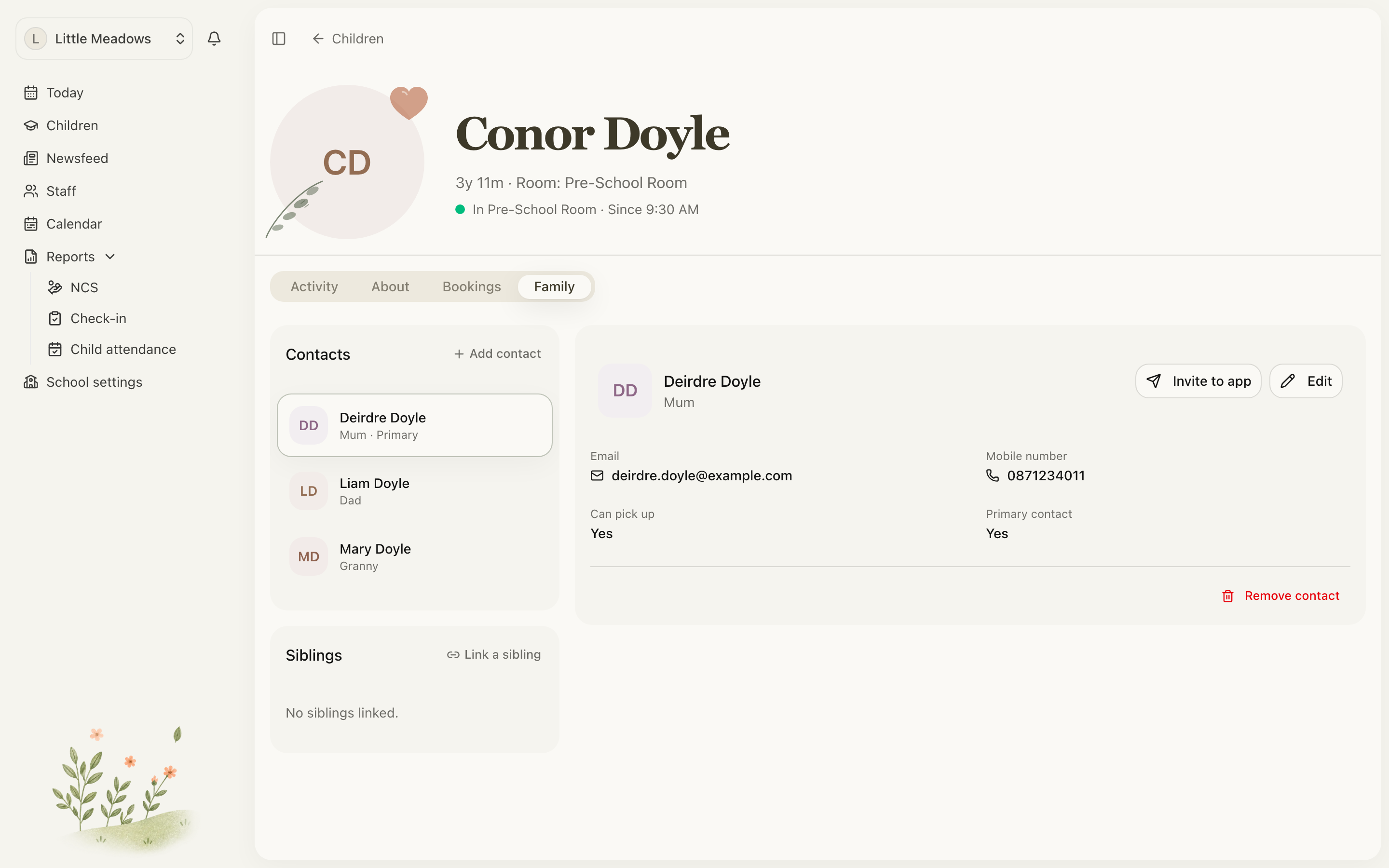
Open a child's profile and choose the Family tab. You'll see two parts:
- On the left, the Contacts list — everyone linked to this child.
- On the right, a detail pane showing the contact you've selected.
If nobody's been added yet, both sides read No contacts added yet.
Adding a contact
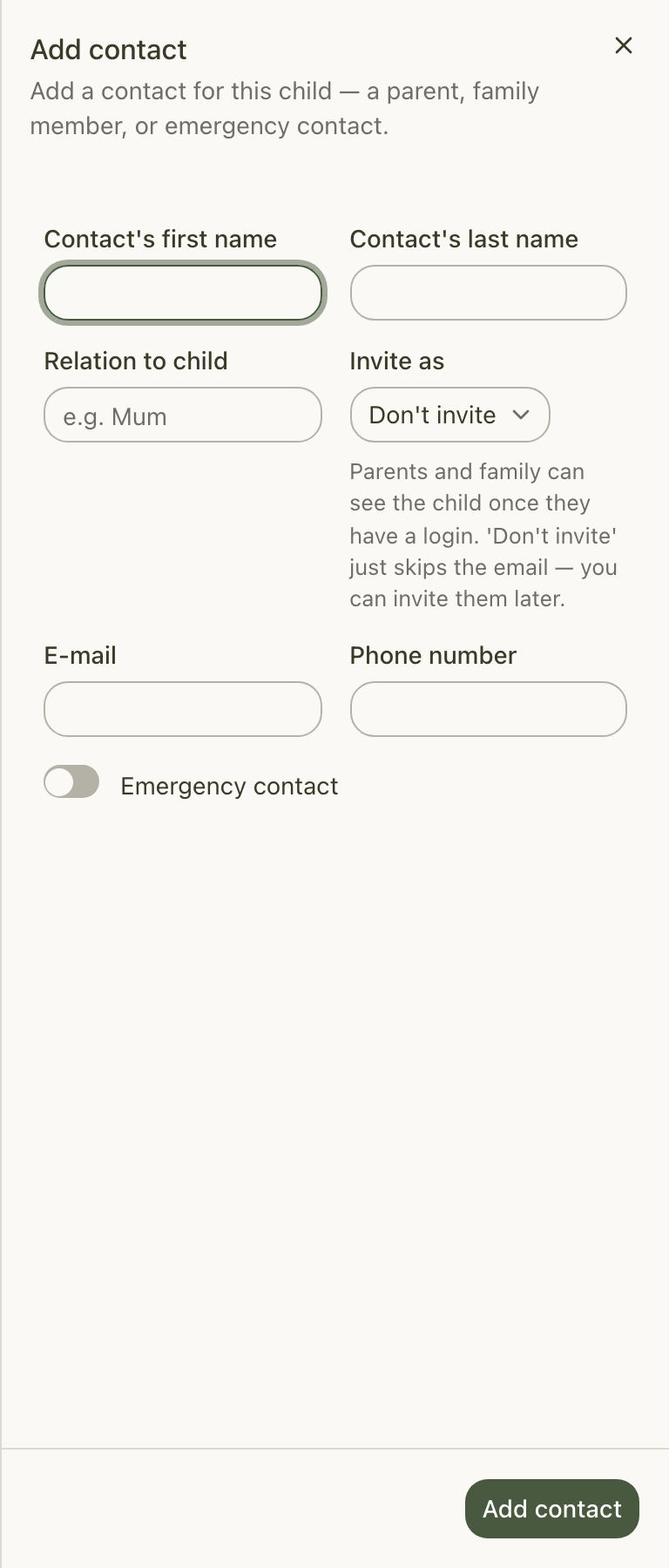
- Open the child's Family tab and click Add contact at the top of the Contacts list.
- Enter the Contact's first name and Contact's last name.
- Optionally add a Relation to child — a free-text label such as "Mum". This is just for your reference (see the note below).
- Add an E-mail, a Phone number, or both. At least one is required.
- Under Invite as, choose whether to send them a login (more on this below).
- Turn on Emergency contact if they're someone to call in an emergency.
- Click Add contact. You'll see Contact added.
Note: Relation to child is only a label. It doesn't decide what the person can see or whether they can collect the child — that's set by their role under Invite as (Parent or Family). The Emergency contact toggle simply flags someone as an emergency contact.
What "Invite as" does
Invite as controls one thing: whether this person gets a login, and as what.
- Don't invite — adds the contact now without sending anything. You can invite them later.
- Parent — adds the contact and emails them a Parent login straight away.
- Family — adds the contact and emails them a Family login straight away.
There's no separate "approved pickup" type to choose here. To send a login at any point — now or later — see Inviting parents and family.
Reading the detail pane
Select a contact on the left and the detail pane shows everything about them:
- Email and Mobile number
- Can pick up — Yes or No, whether they're authorised to collect the child
- Primary contact — Yes or No
- Their login status — an Active badge once they've signed in, or Invited while an invitation is pending, alongside the role they were invited as.
The primary contact
One person on each child can be the Primary contact — "the first person we contact for daily updates and emergencies."
You set this from the Edit form, not when first adding someone:
- Select the contact and click Edit in the detail pane.
- Turn on Primary contact.
- Click Save.
Setting a new primary automatically clears the previous one, so there's only ever one per child.
Editing a contact
To change a contact's details, select them and click Edit. Update any of their name, relation, email or phone, then Save. You'll see Contact updated.
Tip: If a contact has no email yet and you'd like to invite them, add one here first — the Invite to app button only appears once a contact has an email address.
Removing a contact
Removing is staff-only, so you'll only see the Remove contact button if you're a member of your team. What happens next depends on whether the person is linked to other children.
Linked to more than one child
If the contact is also on another child (a parent of siblings, say), you'll be asked to choose:
- Unlink from {child} — removes only this child's link. The contact, their login and their other links stay exactly as they are.
- Remove from all children — removes every link. Because that's their last link, it also revokes their login, archives the contact and cancels any pending invitation.
Linked only to this child
If this is their only child, Remove contact does the full cascade: it revokes their login, archives the contact and cancels any pending invitation.
Contacts are archived rather than deleted outright, so a child's history stays intact and you can always add someone back later.
Who can do what
| Action | Who can do it |
|---|---|
| Add and edit contacts, set the primary | Owners, Managers, Senior Practitioners — and a Parent for their own children |
| Remove a contact | Any staff member (Owner, Manager, Senior Practitioner, Practitioner) — never a Parent or Family |
Sending and managing logins (inviting, cancelling, changing roles) is covered in Inviting parents and family.
Common questions
How do I add an emergency contact or an approved pickup person? Use the Emergency contact toggle on the Add contact form to flag an emergency contact. There's no separate "approved pickup" type — Invite as only controls login access and the person's role. Whether someone can collect the child is shown as Can pick up in the detail pane.
Why does "Don't invite" still let me invite them later? Don't invite simply skips sending the invitation email for now. The contact is still added, and you can select them at any time and choose Invite to app to send a login.
What's the difference between "Unlink from this child" and "Remove from all children"? Unlink removes only the current child's link and leaves the contact and their login intact elsewhere. Remove from all children removes every link — and because that's their last one, it also revokes their login, archives the contact and cancels any pending invitation.
How do I set the primary contact? Open the contact, click Edit and turn on Primary contact. New contacts always start as non-primary, and setting a new primary clears the previous one for that child.
Troubleshooting
I tried to remove a contact and got "Staff members cannot be removed from here." That person also has a staff role on your service. Staff can't be removed from a child's Family tab — update their status in the Staff section first. Account owners must be removed from account settings, and you can't remove yourself from a child's profile.
Adding a contact failed with "A contact with this email already exists in this playschool." Each email can belong to only one active contact per service. If the person is already a contact (for example, on a sibling), edit or re-use that existing contact rather than creating a new one with the same email.