
School settings
Where to manage your name and logo, rooms, opening hours, session types, calendar and billing.
School settings is where you set up the basics of your service — your name and logo, your rooms, when you're open and the session types you offer. You'll find it at the bottom of the sidebar.
This page is staff-only. Parent and family accounts can't see it, and if they try to open a settings link they're sent back to their children's view instead.
Finding your way around
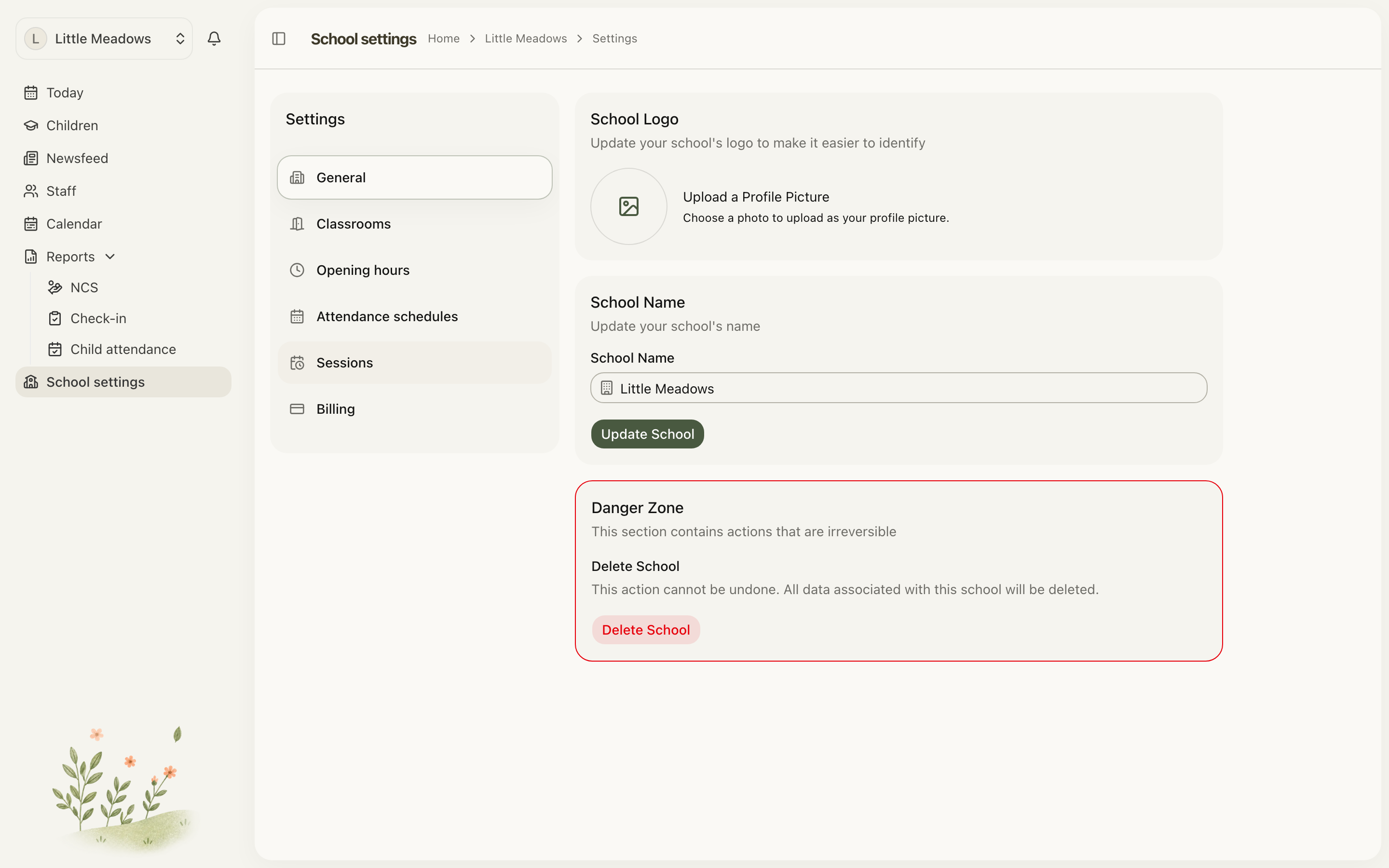
Open School settings from the sidebar and you'll see a master-detail layout: a Settings menu down the left, and the active page on the right. The menu lists, in order:
- General — your school's name and logo.
- Classrooms — create and manage your rooms.
- Opening hours — the recurring weekly hours you're open.
- Attendance schedules — the named booking calendars (Full Year, terms, camps) plans run on.
- Sessions — your session types, the bookable windows you assign to children's plans.
- Billing — your subscription and invoices. This only appears if billing is switched on for your school.
General
This is where you set how your school is identified across Meadow.
- In the School Logo card, upload a photo to make your service easy to recognise.
- In the School Name card, edit your name and save.
Classrooms
Rooms are the spaces you assign children and staff to. From the Classrooms tab you can add, edit and archive them — the full walkthrough lives in the rooms guide.
Note: Rooms are archived, never deleted, so historical attendance and room assignments stay intact. An archived room is hidden but can be restored later.
Opening hours
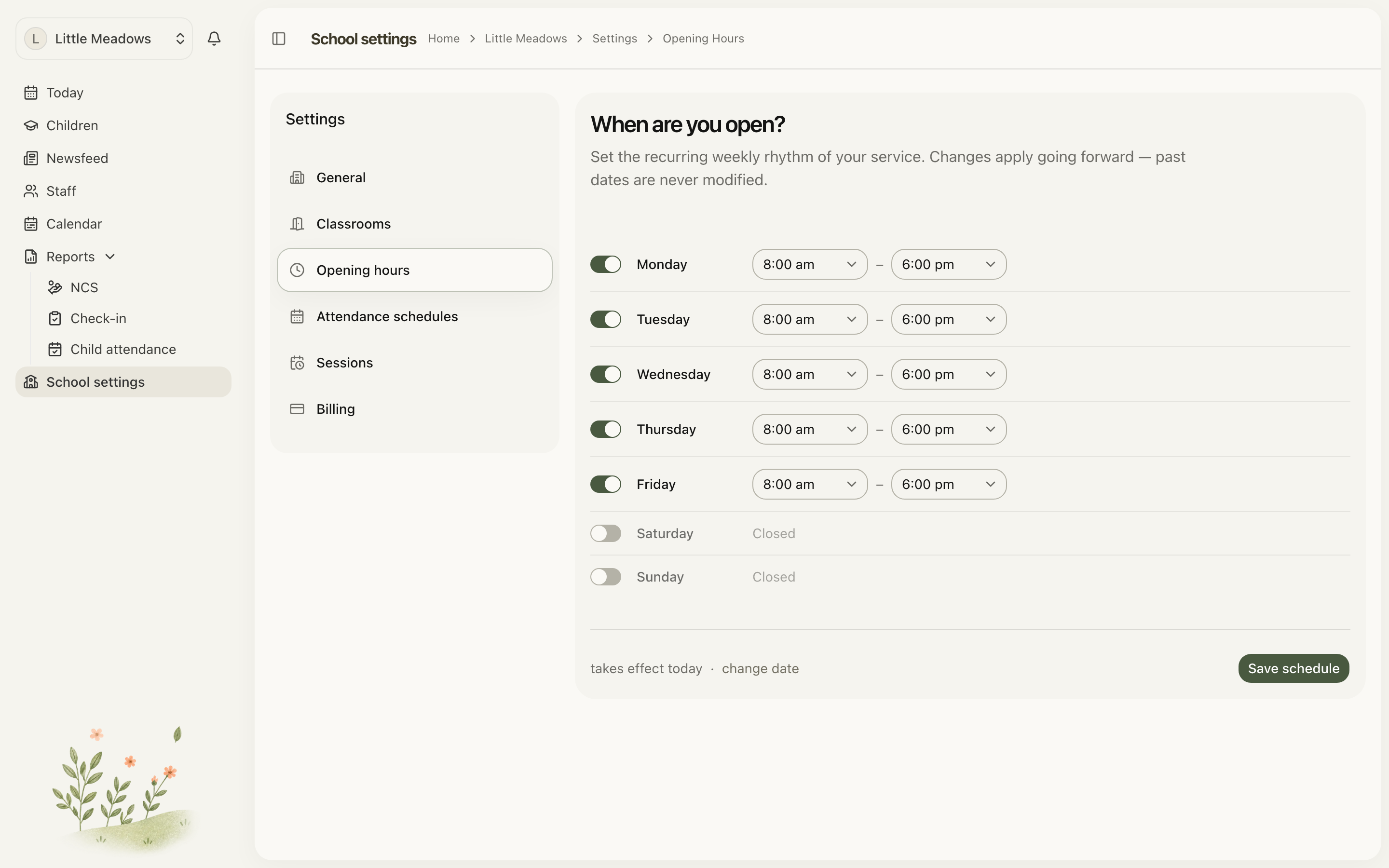
Opening hours set the recurring weekly rhythm of your service — which days you're open and the times each day. To set them:
- Go to School settings and open Opening hours.
- For each weekday, Monday to Sunday, use the switch to mark the day open or Closed.
- For each open day, set Opens at and Closes at using the time pickers.
- By default changes take effect today. To start them on a later date, use the change date link.
- Click Save schedule. You'll see the toast Schedule saved. Future days re-synced.
A few rules to know:
- Changes apply going forward only. Past dates are never modified.
- An open day needs both an opening and a closing time.
- The closing time must be after the opening time.
- At least one weekday must be open.
Opening hours, attendance schedules and the Calendar
These three are easy to mix up, so here's the difference:
- Opening hours (in School settings) — your recurring weekly pattern of open and closed days, and the times for each. This is the backbone everything else lines up with.
- Attendance schedules (in School settings) — the named calendars a booking runs on: Full Year (every open day), or specific dates for a term or camp. You pick one when editing a child's plan, and this is also where ECCE programme years live. See session types and the plans guides for how these feed funding.
- Calendar (the separate top-level menu item, not in settings) — your one-off closures, bank holidays and training days. See the service calendar guide.
In short: opening hours are your weekly rhythm, attendance schedules are the booking calendars for plans, and the Calendar handles the exceptions.
Sessions
Session types are the bookable windows — Full Day, Morning and so on — that you assign to children's weekly plans. Set these up before you start building plans. The full guide is under session types.
Billing
If billing is switched on for your school, the Billing tab is where you manage your subscription and invoices. Only owners can manage billing; other staff see a notice that they can't make changes.
Who can change settings
Access varies by tab and is tied to each person's role:
- General — owners and managers can save changes. (Other staff may see the forms, but their changes won't save.)
- Classrooms — owners and managers can add, edit and archive rooms; senior practitioners and practitioners can view the rooms but see no controls.
- Opening hours and Attendance schedules — owners and managers only. Everyone else sees You don't have access to the calendar.
- Sessions — owners and managers can manage; senior practitioners and practitioners see the tab read-only.
- Billing — owners only.
Parent and family accounts can't reach any part of School settings.
A good setup order
If you're starting fresh, working through the tabs in this order keeps things tidy:
- General — set your name and logo.
- Classrooms — add your rooms.
- Opening hours — so attendance lines up with when you're actually open.
- Attendance schedules — add any terms or camps beyond your default Full Year.
- Sessions — define your session types before building children's booking plans.
Common questions
My opening hours won't save. Check three things: every open day has both an opening and a closing time, each closing time is after its opening time, and at least one weekday is open. Meadow will flag the exact problem — for example Required when day is open, Closing time must be after opening time, or At least one weekday must be open. Remember that changes only apply from the effective date forward; past dates never change.
What's the difference between Opening hours, Attendance schedules and the Calendar? Opening hours set your recurring weekly open and closed days and times. Attendance schedules are the named calendars a booking runs on — Full Year, or specific dates for a term or camp — picked when editing a child's plan. Bank holidays, one-off closures and training days are handled on the separate top-level service calendar, not in School settings.
Parents and family say they can't find School settings. That's expected. School settings is staff-only, so parent and family accounts are sent to their children's view if they try to open it. They can't see rooms, sessions, opening hours or billing.
Troubleshooting
I open Opening hours or Attendance schedules and see "You don't have access to the calendar". These two tabs are limited to owners and managers. The message reads: Only owners and managers can view and manage the service calendar. Contact an owner if you need access. Ask an owner if you need it.
I can't see the controls to manage rooms or sessions. Senior practitioners and practitioners can view the Classrooms and Sessions tabs but not change them — those need owner or manager permissions. Ask an owner or manager to make the change, or to upgrade your role. See roles and your team.