
Booking plans
Build a child's weekly pattern of sessions and see their funding breakdown.
A booking plan sets out the sessions a child attends each week. It's also where Meadow shows you how that week is funded — the split across ECCE, NCS and what the family pays privately.
You'll find it on the child's profile, on the Bookings tab. Owners and Managers can edit booking plans; other roles don't see this tab.
Before you start: A plan is built from your session types — the bookable windows like Full Day or Morning. If you haven't set any up yet, do that first.
Where to find a child's plan
- Open Children from the sidebar and click the child.
- Go to the Bookings tab.
- In the Sections list on the left, choose Bookings.
- Click Edit (the pencil) to open the Edit booking plan sheet.
If there's no plan yet, the card reads No booking plan yet. until you create one.
Building the weekly pattern
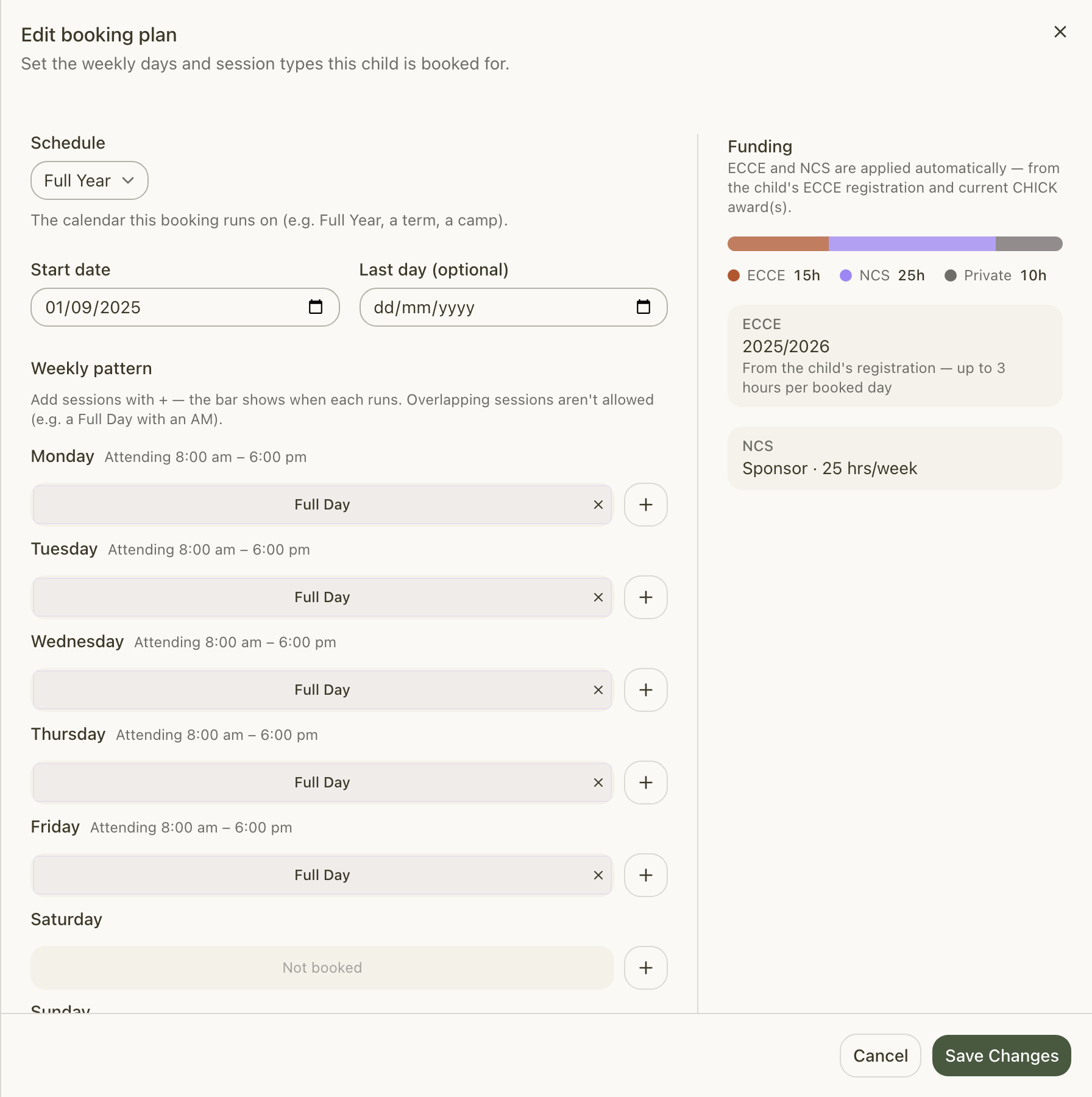
The Edit booking plan sheet is where you set the period and lay out the week.
- Pick the Schedule — the calendar the booking runs on (for example Full Year, a term or a camp). Most children sit on your Full Year schedule, which is selected by default.
- Set the Start date — the first day the plan applies.
- Optionally set a Last day (optional) — leave it blank for an ongoing plan.
- Under Weekly pattern, build each day:
- For a weekday, click + and pick a session type.
- It appears as a bar on that day's timeline, so you can see when it runs.
- Add more than one session to a day if you need to (a Morning and an Afternoon, say).
- Keep an eye on the Weekly hours total as you go — it updates with every change.
- Click Save. You'll see a Plan saved toast.
Note: Sessions on the same day can't overlap. Meadow only offers you session types that still fit — once a day is full it shows No more sessions fit this day. A day with nothing booked reads Not booked.
You need at least one booked day to save. A child has one plan at a time; when you set a new period, it carries on from the previous one rather than overlapping.
Reading the funding breakdown
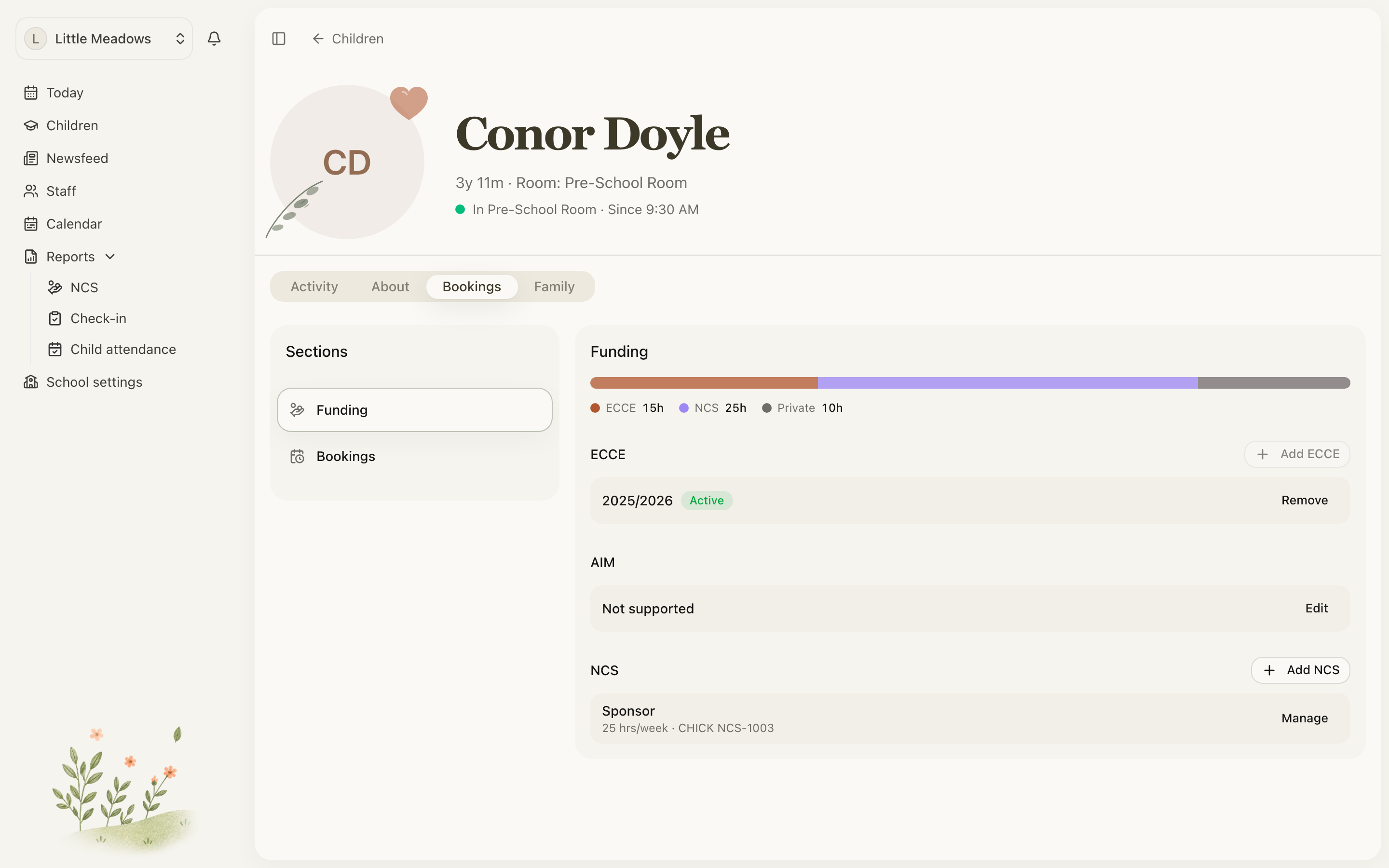
Alongside the weekly pattern, Meadow shows a live breakdown of the week across three bands:
- ECCE — hours covered by the child's ECCE registration.
- NCS — hours covered by the child's NCS subsidy (CHICK award).
- Private — everything left over, which the family pays for.
This isn't something you fill in. As the on-screen note says, ECCE and NCS are applied automatically — from the child's ECCE registration and current CHICK award(s). The breakdown recalculates as you edit the pattern, so you always see how the week is funded.
You set those registrations up separately, in the Funding section of the same Bookings tab (with Add ECCE and Add NCS). There's no step where you attach a registration to a plan — once it's on file, it flows into the breakdown automatically.
- ECCE funding — how ECCE is registered and what it covers.
- NCS funding — recording CHICK awards and subsidised hours.
Common questions
Where is the booking plan? I can't find it on the About tab. It lives on the Bookings tab, not About. Open the child's profile, go to Bookings, then choose Bookings in the Sections list and click Edit. The tab is staff-only, so parents and family never see it.
Why can't I add a second session to a day? Sessions can't overlap. If a Full Day is already booked, there's no room for a Morning alongside it, so Meadow only offers session types that still fit. Once the day is full you'll see No more sessions fit this day.
I'm being told there are no session types — how do I add them? The editor shows an alert, No session types yet. Set them up in Settings → Sessions., and Save stays disabled until you have at least one. Create your bookable windows first — see Session types — then come back and build the plan.
Why isn't ECCE or NCS funding showing on the plan? The breakdown is built from the child's registrations, not from anything you tick on the plan itself. If a band reads zero, check that the child has an ECCE registration and/or a current CHICK award on file in the Funding section, and that the plan's dates fall inside the relevant period. See ECCE funding and NCS funding.